

Whisk AI Complete Guide 2026: Review, Step-by-Step Tutorial, and Comparison
Let’s cut to the chase. If you want to learn exactly how to use the new Whisk AI tool from Google Labs, you have found the perfect guide. You solve your creative roadblocks effortlessly with this platform because it relies on a purely visual process. You simply upload three pictures. You pick one photo for your subject, a second for the scene, and a third to dictate the style.
The generative AI analyzes these three reference images and synthesizes them to produce a brand new realistic picture. You don’t need to type any confusing text descriptions. Whisk AI acts as a revolutionary image to image AI generator, a platform built to ignore traditional text prompts entirely.
I spent the last 30 days practically living inside this beta testing environment. I will show you exactly how the interface operates. I will compare it directly to Midjourney and Stable Diffusion. I will also give you my exact step-by-step workflow so you can generate compelling visuals right now.
Why Traditional Prompt Engineering is Exhausting
I must make a confession. I feel incredibly tired of typing AI prompts. Last Tuesday, I spent nearly one hour trying to force a standard text-to-image synthesis tool to generate a picture of an old coffee machine. I wanted the object sitting on a bright Tokyo street, and I needed it to look like a vintage oil painting.
I typed vocabulary words until my fingers physically hurt. The algorithm handed me a blurry mess. It looked exactly like a toaster exploding in a dark room.
Whisk AI: Google Labs’ Solution for Visual Thinkers
If you play around with any AI photo generator lately, you probably hit this exact same wall. Your ability to write robotic text commands completely controls your final picture. Many people feel like they must purchase expensive prompt engineering courses just to get a simple visual asset.
Google Labs recently launched a tool that completely eliminates this creative friction. They call it Whisk AI. The company currently operates it within their experimental portal. After pushing the Imagen 3 framework to its absolute limits, I genuinely believe it will fundamentally change how we create visual content. It lets you show the neural network what you want instead of forcing you to tell it. Here is my ultimate guide to navigating this weird, wonderful, and very accessible new platform.
The Exhausting Vocabulary Test of Older Models
When I first heard the news about Whisk AI, I rolled my eyes. We already have DALL-E 3, Midjourney, and Stable Diffusion. I wondered what Google could possibly bring to the table. Interestingly enough, Whisk doesn’t try to copy Midjourney.
The Prompt Engineering Trap
Traditional text-based models act like vocabulary tests. If you want a masterpiece, you need a massive dictionary of descriptors. You spend hours executing trial and error. You build large libraries of prompt formulas. Whisk AI operates purely as an image to image AI generator.
Removing the Language Barrier
It completely removes the language barrier. Have you ever tried to describe a specific 1970s film grain aesthetic to a computer? The process exhausts you. This problem becomes even worse for international users who don’t speak English as their first language.
With Whisk, you don’t describe the vibe. You just upload a photo that already possesses that vibe. The diffusion models extract the visual details automatically. Google built this AI-powered design tool for visual thinkers who hate pulling their hair out over text prompts.
The Interface and Setup Experience
Setting up your workspace takes only a few seconds. You just go to the Google Labs portal. You sign in with your regular Google account.
A Minimalist Workspace
The platform features a very clean, minimalist interface. It removes all the confusing menus that you usually see on other AI websites. The tool integrates perfectly with your Google Workspace. If you are already logged into your email, you don’t need to execute any extra security steps.
Desktop versus Mobile Devices
I must mention the device experience. The responsive design works on mobile phones, but the picture upload process feels much smoother on a desktop computer. A large desktop monitor gives you better file management when you need to select your reference photos.
How the Three-Input Visual Engine Actually Works
The absolute core of Whisk AI is its revolutionary three-part dashboard. When you open the workspace, you will not find a text box waiting for your command. Instead, you get three distinct upload zones. You feed the engine three separate pictures. The system mathematically bakes them together into a new composition. It uses your reference images to ground the generation, utilizing semantic extraction from the inputs.
Here is exactly how you leverage these inputs in the real world:
Input 1: Mapping the Subject
This picture acts as the undeniable star of your show. It could be a person, a pair of sneakers, your golden retriever, or a coffee mug. The algorithm does its absolute best work when your subject image has sharp focus and a clean background.
If you upload a chaotic crowd photo and silently hope the machine finds the one guy in the red hat, you will fail. You must give the engine clear boundaries. Product photography with clean professional lighting serves as excellent subject material.
Input 2: Defining the Scene
This picture tells the system where to place your subject. Maybe you choose a pristine beach, a clean modern office, or the surface of Mars. The scene creates the background context.
The ambient lighting calculations constantly surprise me here. Whisk AI doesn’t just copy and paste your subject onto the background. It actually copies the ambient lighting of the scene and shines it onto your subject. This sophisticated rendering makes the final image feel completely authentic. You should avoid scenes with too many small details or conflicting light sources.
Input 3: Capturing the Style
This section makes the process genuinely fun. Your style reference determines the mood, the colors, and the art type. You can upload a classic watercolor painting, a gritty old snapshot, or a shiny 3D rendering.
The AI acts like a visual sponge. It soaks up the color palette, the brushstrokes, and the grain. It then paints these elements universally onto both the subject and the scene. Make sure your style images have consistent visual characteristics.
Whisk AI vs The Heavyweights (Midjourney & DALL-E 3)
How does this tool actually stack up against the subscriptions we already pay for? I don’t think Whisk will replace these platforms for abstract artists, but it definitely carves out a massive, highly practical niche.
| Feature | Whisk AI | Midjourney | DALL-E 3 |
|---|---|---|---|
| Main Input Method | Visual (3 Uploaded Images) | Complex Text Prompts | Chat Text |
| Learning Curve | Very Low (Show it pictures) | Hard (Needs exact syntax) | Low |
| Predictable Results | Extremely High | Low to Medium | Medium |
| Best Used For | Brand consistency, product photos | Abstract art, crazy ideas | Making scenes from scratch |
Whisk AI vs Midjourney
If I need to create an entirely impossible concept from my imagination, I still reach for Midjourney. Midjourney offers supreme artistic flair. But imagine you have a real product photo. You need to drop it into a specific lifestyle setting while matching your exact brand colors. Whisk AI wins this test every single time because it gives you exact element control.
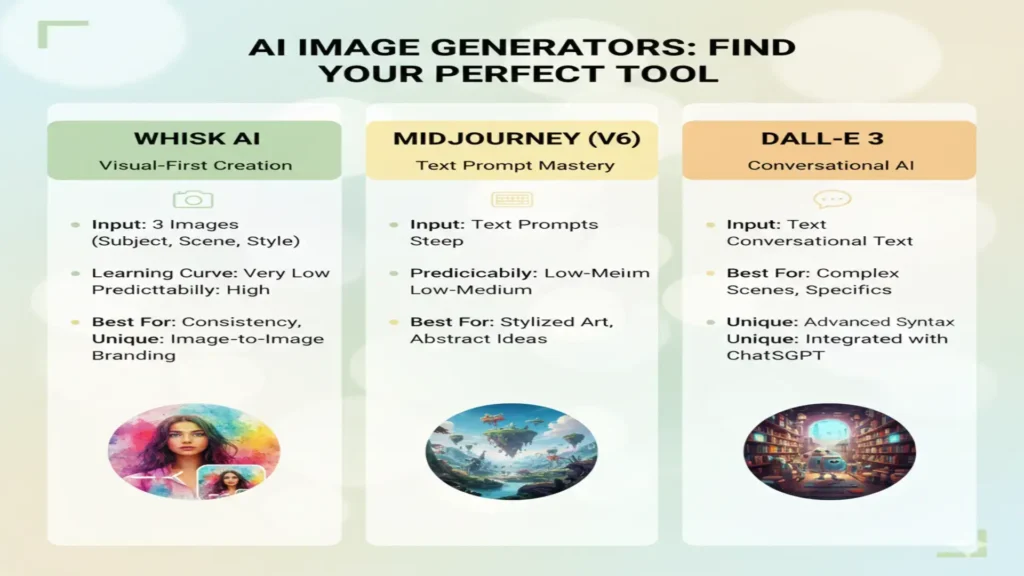
Whisk AI vs DALL-E 3
DALL-E 3 excels at understanding complex text descriptions and creating busy scenes from nothing. Whisk AI cannot do this. However, Whisk AI shines when you need to remix existing visual elements with perfect precision.
Whisk AI vs Stable Diffusion
Stable Diffusion offers unmatched customization. It gives technical users hundreds of extensions and parameters. Whisk AI sacrifices this deep customization. It provides a streamlined interface and user-centric design instead. It appeals to users who prioritize speed over endless tweaking.
My Step-by-Step Workflow for Professional Results
Achieving professional grade results requires a smart strategy. The tool includes a history section where you can review previous generations and bookmark your successful combinations.
Here is the exact workflow that helps me avoid frustration:
1. Pick Your Assets Before You Start
You shouldn’t blindly grab the first three images off Google. I organize a dedicated folder on my computer for high-quality references. I categorize them by subjects, scenes, and styles. If you want to enhance image quality free of weird AI mistakes, you must start with high-resolution inputs. Bad inputs create bad outputs.
2. Check the Vision of the AI
Drop your subject, scene, and style images into the tool. Whisk briefly creates a tiny text tag that confirms what it sees in your uploads. Pay close attention to this text. If you upload a vintage car and the AI calls it a red rectangle, your reference image is too vague. You need to swap it out for a clearer picture.
3. Check for Thematic Harmony
Before you hit the big generate button, look at your three images side by side. Do they share any complementary colors? Mixing a hyper-realistic human face with a flat cartoon background might work, but it often gives the engine an identity crisis. Strong combinations share compatible lighting conditions.
4. Generate, Evaluate, and Change
You click the generate button, sit back, and watch the visual remixing process unfold. The rendering usually takes 30 to 90 seconds depending on the server load and image complexity. Here is the big secret. If the first result looks bad, don’t scrap the whole thing. The tool gives you advanced editing options. Just swap out the style image or change the scene image and run it again. You must isolate your variables one at a time. The platform supports multiple image formats and resolutions, so you can download the best version for your needs.
The Business Case: Replacing Expensive Subscriptions
This tool introduces a huge shift in the business world.
Replacing Stock Photo Subscriptions
Many companies spend thousands of dollars on stock photo subscriptions every year. They constantly struggle to find the exact image they need. With Whisk AI, a company can take a basic photo of their product, upload a picture of a desk, and upload a picture of their brand colors. The AI creates the perfect custom stock photo instantly.
Replacing Online Art Courses
Furthermore, many beginners spend money on online art courses just to learn how to edit photos together in Photoshop. Whisk AI performs the complex lighting and blending automatically. You do not need to master advanced editing software anymore because the machine handles the technical heavy lifting. You just need a sharp eye for choosing reference pictures.
Who Should Use Whisk AI?
Different types of creators will find incredible value in this platform.
- Social Media Managers: People who run Instagram accounts love this tool. They can upload a specific style image to ensure every single post matches their exact brand aesthetic perfectly.
- Professional Photographers: Photographers can take a basic portrait shot in a boring studio. They can then upload a beautiful mountain scene and let the AI place their subject into the wild with perfect natural lighting.
- Marketing Teams: Teams can visualize new advertising campaigns rapidly. They can combine product shots with different seasonal scenes in just seconds.
The Glaring Blind Spots: Where Whisk AI Fails
No AI tool achieves perfection. Whisk possesses a few glaring blind spots you need to know about right now. It ranks as an incredible asset, a platform celebrated for combining photos intuitively, but it definitely has limits.
The Text and Spelling Problem
It completely falls apart if you need readable text. If you want a specific word written on a billboard or a neon sign, Whisk will generate fake alien letters. It relies entirely on mixing pictures rather than understanding typographic rules. Therefore, it simply cannot spell.
The Physics and Reality Problem
It also struggles with highly abstract or impossible requests. It thrives on real physics. If you give it conflicting shadows or impossible shapes in your reference photos, the final output will look like a broken video game. It struggles with pure science fiction imagery if you do not provide realistic base elements.
Frequently Asked Questions (FAQs)
When you dive into the world of multi-image synthesis, a few technical concerns naturally arise. Here are the clear answers to the most common questions about this Google Labs platform.
Conclusion: The End of Robotic Text Commands
If fighting with text prompts makes you angry, I highly recommend visiting Google Labs to try Whisk. The traditional text prompt is finally being replaced by intuitive visual inputs. A massive shift in creative workflows is expected by industry experts. I must warn you though. Once you experience the freedom of uploading pictures instead of typing a 200-word paragraph, you will find it incredibly hard to go back to the old methods.


