

Unlock Unlimited Creativity: The Best Free AI Image Generators Right Now
Picture this scenario. You have a complex design idea burning in your head at 2:00 AM, but you possess zero budget to hire an illustrator. A surreal landscape, a product mockup, or a portrait in a specific artistic style feels out of reach. A year ago, that idea would have stayed locked in your imagination. Free AI image generators have fundamentally changed what is possible on a nonexistent budget.
Some of the most exhilarating creative tools available today cost absolutely nothing. That still feels strange to say because quality always demanded real money for most of design history. Stock photo subscriptions, software licenses, and freelance budgets created a massive wall. The barrier to making something that looks good was incredibly steep.
Learning how to generate AI images for free is no longer a secret. However, not all free tools are equal. Some platforms are genuinely extraordinary, while others will just waste your afternoon. This guide cuts to the chase. We will dig into Google Whisk AI, a platform transitioning into the new Google Flow ecosystem, alongside the best free AI art tools worth your time. Expect no empty hype here.
The Harsh Truth: Why Most “Free” AI Generators are Actually a Waste of Time
The word free covers a lot of ground in the software industry. Some tools operate as basic trials, granting you generous access for 20 minutes before hitting a hard paywall. Others remain substantively free in ways that truly matter for regular creative work.
Here is what actually matters when evaluating any free AI image generator:
- Output quality: Sharpness, coherence, and whether the result looks intentional or glitchy.
- Prompt comprehension: Does it understand nuance, or does it reduce your description to something generic?
- Daily or monthly limits: Are they realistic for actual use, or merely decorative?
- Image-to-image capability: Can you feed it a reference image, or only text?
- Commercial terms: Can you actually use the files you make?
One common mistake involves optimizing entirely for output quality without checking the legal guidelines. Adobe Firefly and Bing Image Creator enforce very different rules around AI image commercial use rights. If you create visuals for a client, you never want to discover those limitations after the fact.
Google Whisk AI: Why I Think “Showing” is Better Than “Telling”
Most platforms work the same basic way. You type a description, the model interprets it, and an image appears. That workflow functions fine, but translating a visual idea into precise words is genuinely hard. The image in your head rarely survives the trip into text-to-image synthesis.
A Google Whisk AI review reveals a completely different philosophy. Instead of describing what you want, you show it. You select a subject, choose a scene, and pick a style reference. Then the system executes a visual remixing process. Note that as of April 30, 2026, Google officially folded Whisk’s features into Google Flow, bringing the powerful Imagen 3 models into a unified workspace.
Breaking Down the Visual Synthesis Workflow
The technical approach here directly affects how you use the tool. It does not do simple image blending or collaging. It uses your reference images to ground the generation process. Semantic meaning is extracted from the inputs by the algorithm. Then, a new image is generated that reflects that understanding in a fresh composition.
In practice, the output remains recognizably related to your inputs without being a direct copy. Drop in a photo of a specific dog, a forest path, and a watercolor painting as your style reference. You will get a watercolor illustration of that dog on a forest path. It is the real deal for intuitive creators.
Where Whisk AI Fails (Know the Limits)
This platform excels at rapid concept exploration. For content creators building visual libraries, it is incredibly intuitive.
If you need surgical control over specific compositions or exact color palettes, the image-driven approach can feel imprecise. You are suggesting rather than directing. For meticulous control, text-prompt tools with negative prompting capabilities serve better.
The Heavy Hitters: Which Free AI Generator Should You Actually Use?
Free AI image creation software has removed the cost barrier that once separated hobbyists from professionals. Here is what each major option brings to the table.
Adobe Firefly: The Only “Safe” Bet for Professionals?
Firefly is what happens when a company with 40 years of design experience builds a generative engine. It is polished and commercially safe AI in a way that genuinely matters. The free tier gives you an allotment of 25 monthly Adobe Firefly free credits, which resets each month and covers moderate use comfortably.
What makes Firefly uniquely valuable is its training data. Adobe built it strictly on licensed images and public domain content. If you are a small business owner, that distinction carries paramount importance.
Having this engine embedded in your existing workflow removes significant friction from the daily creative process.
Bing Image Creator: The Zero-Learning-Curve King
Microsoft’s generator is the most accessible starting point for newcomers. You sign in with a Microsoft account, type a description, and within seconds you receive 4 image options. The system provides 15 daily Bing Image Creator tutorial boosts to ensure fast generation.
The quality is reliably excellent across a wide range of styles. What truly stands out about Bing’s implementation is its accurate text rendering. When you need an image that includes readable words, this platform outperforms competitors that frequently hallucinate text.
Stable Diffusion: For the “I Want No Limits” Crowd
Here is where things get interesting for anyone willing to go a little deeper. Stable Diffusion is open-source. Running it locally on your own hardware costs nothing. There are 0 daily limits and zero subscriptions.
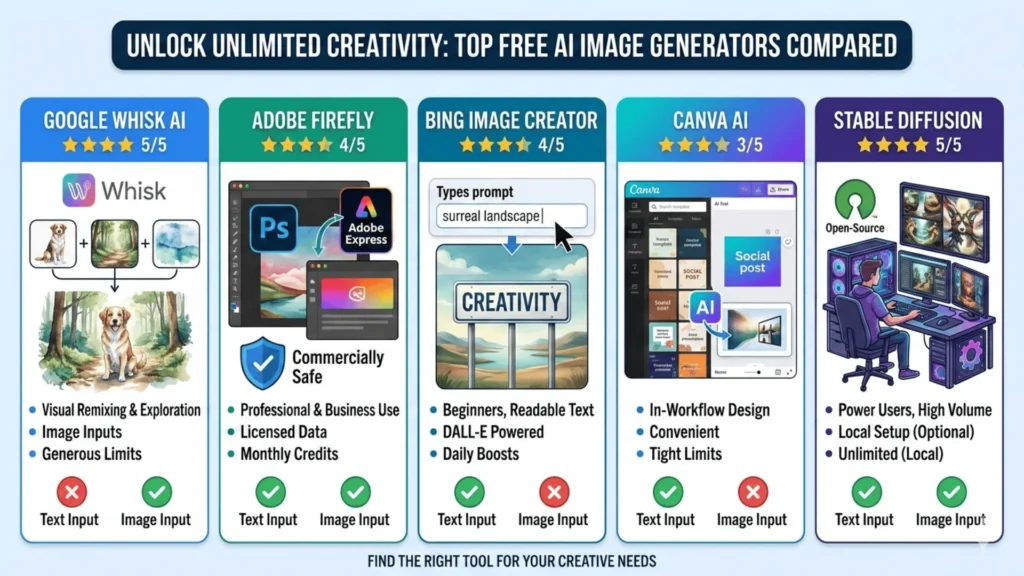
The tradeoff is setup complexity. A Stable Diffusion local setup requires heavy GPU acceleration and comfort with a local interface, but the one-time investment pays back quickly if you produce high volumes of images. It is an amalgamation of technical settings exploring the latent space.
Free AI Image Generator Comparison
| Tool | Output Quality | Free Limit | Best Use Case | Commercial Use | Image Input |
|---|---|---|---|---|---|
| Google Flow (formerly Whisk) | Excellent | Generous | Visual remixing | Check terms | Yes |
| Adobe Firefly | Very Good | 25 credits/mo | Commercial work | Yes | Yes |
| Bing Image Creator | Very Good | 15 daily boosts | Text in images | Limited | No |
| Canva AI | Good | Tight limits | In-workflow design | Limited | No |
| Stable Diffusion | Excellent | Unlimited | Power users | Yes | Yes |
3 Lessons I Learned After Generating 1,000+ Bad AI Images
I must confess something. I spent 3 weeks blaming tools for mediocre outputs before realizing the issue was my own lazy prompts.
I fell hard into The Adjective Trap. I wasted hours typing useless descriptors like “stunning” or “hyper-realistic”, so I finally realized that specific style references do all the heavy lifting.
A few structural adjustments made a measurable difference.
Describe the mood, not just the subject. “A coffee shop” is generic. “A narrow coffee shop in early morning light, steam rising from cups, slightly overexposed like an old film photo” gives the model something real to work with. Atmospheric details matter immensely.
Use reference images whenever the tool allows it. A good reference image communicates in 1 second what 20 words struggle to convey.
Treat your first output as a draft, not a result. The best practitioners iterate constantly. You change the lighting descriptor, watch the render load, and refine your next move. Change one variable at a time rather than generating entirely new prompts.
Frequently Asked Questions (FAQs)
When creators first explore the world of generative AI, several technical concerns inevitably pop up. Here are the clear answers to your most pressing image generation questions.
Conclusion: The Barrier to Entry Just Hit Zero
The gap between free and paid AI image generation narrows faster than most people realize. Meaningful quality required a paid subscription just 2 years ago. Today, Google Flow, Firefly’s free tier, and Bing Image Creator produce results that seemed completely impossible recently.
What I find genuinely fascinating is the direction these tools are taking. The shift from text prompts to visual inputs reflects a broader evolution. These are platforms empowering creatives to work naturally.
Start with Google Flow if visual-reference workflows appeal to you. Try Bing Image Creator if simplicity is the priority. The barrier to creative output has vanished, leaving us with just the tip of the iceberg regarding future possibilities. This is a creative era bursting with massive accessibility.


