

Complete Guide to Free AI Art Generation: Portraits, Anime, and Beyond (2026)
You want to create an AI portrait, anime character, or digital illustration but do not know where to start. This guide solves exactly that. Below, you will find everything you need to generate stunning AI art using Whisk AI and other free tools, step by step, even with zero design experience.
There is a specific kind of creative frustration that does not get talked about enough. You have an exact image in your head, the lighting, the mood, the character, and absolutely no technical path to get it out. Not because you lack imagination, but because traditional skills like drawing, digital painting, and years of software practice sit behind a wall most people never had time to climb.
That wall is coming down fast.
AI art generation has moved from novelty to genuinely useful creative tool in the span of a few years, and many people still underestimate what is now available and free. Whether you want an ai portrait generator for a custom avatar, an anime-style character for a project, or just want to experiment with digital aesthetics you have admired for years, the barrier to entry has never been lower.
The challenge now is not access. It is knowing where to start and how to think about these tools. This guide walks you through exactly that, from understanding how AI art works, to using Whisk AI to generate portraits and anime, to choosing the right free tool for your creative goals.
What AI Art Generation Actually Is (And Why It Is Not Magic)
Let us clear something up right away, because a lot of confusion starts here. An ai art image generator is not searching a database of existing images and stitching them together. It is a model trained on massive visual datasets that learned the relationships between visual elements, how light behaves, what “melancholy” looks like in color, what makes a composition feel balanced. When you give it a prompt, it synthesizes something new based on those learned patterns.
This distinction matters because it changes how you interact with these tools. You are not retrieving something that already exists. You are collaborating with a system that responds to creative direction.
How This Shapes What You Can Create
The practical implication is that specificity is the core skill. Vague inputs produce vague outputs. “Portrait of a woman” gives the model almost nothing to work with. There are infinite valid interpretations. But “close-up portrait of a woman, mid-40s, warm side lighting from a window, pensive expression, impressionist texture, muted ochre and sienna palette” gives the model a real brief to work from.
Key Fact: The more specific your prompt, the closer your AI-generated output matches your original creative vision.
It is also worth noting: AI-generated art sits in a debated space within creative communities. Some artists see it as a useful collaborator; others raise concerns about training data. If you plan to use generated art commercially, understanding this landscape matters. The more fluently you describe your vision, the closer your results get to what is in your head, and that is a skill you build over time.
Whisk AI: Google’s Different Approach to Creative Generation
Most people encounter Whisk AI through Google Labs and assume it is just another ai graphic generator. It is not, quite. The fundamental difference is how you communicate your creative vision to it.
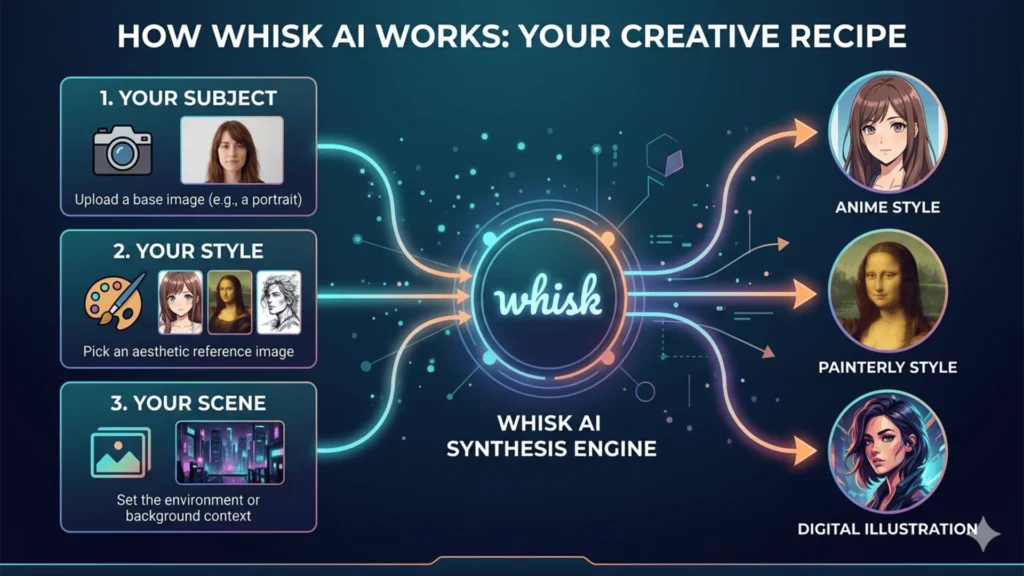
Where traditional tools ask you to describe what you want in text, Whisk asks you to show it. You provide three visual inputs:
- Subject (the person or thing you want depicted)
- Style Reference (the artistic aesthetic you want)
- Scene or Background (optional context)
Whisk then synthesizes these inputs into a unified image reflecting all three. The result often feels more intentional than pure text-to-image generation, because you work visually from the start.
A Practical Walkthrough
Here is how a typical session works. Say you want an anime-style portrait of yourself. You upload a clear photo of your face as the subject, find an image capturing the anime aesthetic you like as your style reference, and optionally add a background scene, a rainy city street, a moonlit forest. Whisk interprets the combination and generates something that bridges all three inputs.
What many people miss is that you can swap style references without changing the subject. Want to see yourself as a watercolor portrait? A comic book character? A Ghibli background character? Keep the subject image constant and cycle through style references.
Bold Fact: Whisk AI lets you generate multiple style variations of the same subject without rewriting a single word of prompt text.
The free tier has daily generation limits, but for personal creative exploration, it is more than sufficient.
Creating AI Portraits That Go Beyond the Default Look
The difference between a generic AI portrait and one that genuinely captures something is almost always in the prompt details. Think like a photographer directing a shoot, not like someone typing a search query.
A good portrait prompt has four layers:
- Subject Specifics (age, expression, distinctive features)
- Lighting (golden hour, overcast diffused, dramatic chiaroscuro)
- Artistic Style (photorealistic, painterly, editorial illustration)
- Mood or Atmosphere (the feeling the image should carry)
Not every layer needs to be exhaustive, but touching each one dramatically improves consistency.
Prompts That Actually Work
Here is the difference specificity makes:
Weak: “Portrait of a man”
Strong: “Close-up portrait of a man in his 30s, weathered features, soft overcast light, oil painting style, thoughtful expression, neutral background”
The second version is a directed brief. The model knows what job it is doing. For free ai portrait generator tools like Adobe Firefly or Bing Image Creator, this level of specificity produces a visible difference in output quality. If the first result is not right, change one variable at a time. Think of it as a conversation with the tool, not a single command.
Generating Anime and Illustrated Styles
Anime is consistently the most-requested style category for free ai art generators, and it has more sub-styles than most people realize. Getting genuinely good anime output from an ai art image generator comes down to knowing the visual vocabulary of the style you want.
Style Keywords That Unlock Specific Aesthetics
These terms correspond to actual recognizable visual traditions:
- Studio Ghibli-inspired: lush, painterly backgrounds, warm color grading, a sense of quiet wonder
- Shonen battle manga: dynamic poses, motion lines, high contrast, bold ink work
- Slice-of-life anime: softer lines, muted palettes, natural lighting, emphasis on emotion
- Makoto Shinkai aesthetic: extraordinarily detailed atmospheric backgrounds, near-photorealistic light
- Chibi: proportionally exaggerated heads, simplified features, high saturation
- Cel shading: clean, flat color blocks common in classic anime
Pro Tip: Combining styles intentionally produces standout results. “Cyberpunk character in Ghibli color palette with cel shading” looks considered, not like default AI output.
Free AI Art Tools: An Honest Comparison
Not all free ai graphic generators are the same, and the right tool depends on what you are trying to do.
| Tool | Best Use Case | Free Tier | Style Control | Learning Curve |
|---|---|---|---|---|
| Whisk AI | Image-to-image style synthesis | Yes (daily limit) | Very High | Low |
| Adobe Firefly | Commercial-safe, high quality | Yes (watermarked) | High | Low–Medium |
| Bing Image Creator | Fast, photorealistic, generous limits | Fully free | Medium | Very Low |
| NightCafe | Artistic styles, fine-tuning | Yes (credits) | Very High | Medium |
| Canva AI | Design integration, social graphics | Yes (limited) | Medium | Very Low |
| Craiyon | Casual experimentation | Fully free | Low | Very Low |
For most people starting out:
- Use Bing Image Creator for immediate results
- Use Whisk AI when you have a specific style vision
- Use Adobe Firefly when output quality matters most
Developing Your AI Image Style Sense
This is probably the most undervalued skill in the whole process. Visual vocabulary, the ability to name and describe what you see in art you admire, powers effective prompting and separates people who get consistently good results from those who feel like they are getting random outputs.
When you encounter an image that stops you, the useful practice is to sit with it and ask: what is it, exactly? The color temperature? The way shadows are handled? The composition choice? The texture?
Over time, this reverse-engineering becomes automatic. You will find yourself looking at an illustration and immediately knowing which ai style image prompt terms would produce something similar.
Bold Fact: Visual vocabulary is the single most transferable skill across every AI art tool, free or paid.
That is the real skill, not just using the tool, but learning to see the way the tool sees.
What Actually Goes Wrong (And Why)
Most struggles with ai generated illustrations free tools trace back to the same patterns:
Prompts that are too abstract. “Emotional” and “beautiful” mean almost nothing to a model. “Warm amber lighting, soft focus, nostalgic atmosphere” is specific enough to act on.
Giving up too early. Your first output is a starting point for iteration, not a verdict. Change one variable at a time and track what shifts.
Ignoring composition. Specifying whether you want a wide shot, medium shot, or close-up dramatically changes the feel of an image. Most people skip this entirely.
Underestimating free options. There is a persistent assumption that free tools produce worse results. For personal art, social media, and experimentation, free art ai generators like Firefly and Bing deliver genuinely excellent outputs.
Frequently Asked Questions (FAQs)
Today, we will discuss the most popular questions that can be used to test a friendship. Here are the comprehensive details:
The Creative Era Has Already Started
The tools explored here, Whisk AI, Firefly, and the growing ecosystem of free art ai generators, are not replacing artists. They extend what is possible for everyone who has visual ideas but not necessarily visual training.
Creativity was never really about technical execution. It was always about seeing something and finding a way to make it real. These tools change the “finding a way” part. The seeing, the curiosity, the taste, the desire to make something that did not exist before, that remains entirely yours.
Start with one tool. Pick a style that excites you. Iterate until something surprises you. That surprise is where it gets genuinely interesting.


