

Whisk AI by Google: The Free AI Image Generator That Works Without Prompts
If you’ve been scratching your head wondering “how does AI image generation work” or searching for “what is Whisk AI,” I completely get it. The landscape is moving incredibly fast. This guide breaks down exactly what’s happening behind the scenes, why Google’s Whisk AI takes a totally different approach from the rest of the pack, and how you can start generating incredible visuals today—even if you hate writing complex text prompts.
A few months back, a friend texted me an image of an astronaut riding a horse through a neon-soaked Tokyo alleyway. It was moody, cinematic, and weirdly beautiful. “Who’s the digital artist?” I asked. She laughed. She hadn’t hired anyone; she just typed a dozen words into a generator and hit enter. The image almost fooled me entirely. Not because it was flawless (if you zoomed in, the horse definitely had five legs), but because the overall vibe was just that convincing.
That brief moment of “wait, is this real?” is something we are all experiencing right now. It proves this isn’t just a fleeting tech fad. AI image generation has quietly shifted from a nerdy research experiment into an everyday creative tool. Yet, most folks I talk to still don’t fully grasp how it works, or more importantly, how to actually use it for their own projects without getting frustrated.
So, let’s clear the air. No ridiculous hype, no doom-and-gloom panic. Just an honest, hands-on look at the tech, the current tools, and why Whisk AI feels like a breath of fresh air compared to everything else out there.
What Is AI Image Generation, Really?
At its core, AI image generation uses massive machine learning models to build visual content based on instructions—like a text description, a reference photo, or a mix of both. You hand the system some clues, and it dreams up a brand new image that has literally never existed anywhere before.
The biggest misconception I see? People think it’s just a glorified Instagram filter or an automated Photoshop tool. You aren’t enhancing a photo or applying a preset. The AI is constructing the image pixel by pixel, relying on patterns it absorbed after analyzing millions of visual examples during its training phase.
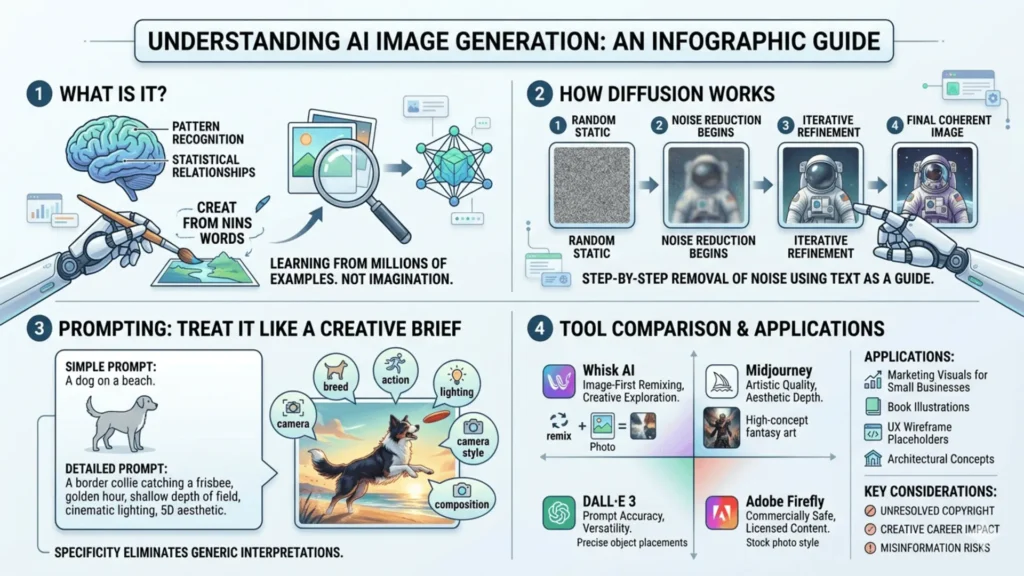
Here is a crucial detail: the AI doesn’t “know” what a lighthouse is the way a human does. It just understands the statistical relationship between the word “lighthouse” and specific visual traits (tall structures, coastal light, crashing waves) across millions of files. It’s advanced pattern recognition, not human imagination. Understanding that distinction will save you a lot of headaches later.
The Diffusion Model Explained Simply
Most modern image generators, including the engine under the hood of Whisk AI, run on something called a diffusion model. If you want the easiest way to picture it, imagine looking at a photograph completely buried under heavy TV static. Slowly and systematically, the computer removes the noise until a clear, sharp image is revealed.
During its training, the model essentially learned how to reverse this “noising” process. When you ask it to make something new, it starts with a canvas of pure, random static. It then uses your prompt as a map to remove that static, leaving behind a coherent picture.
Quick tip: Modern diffusion models complete this massive refinement process in about 20 to 50 steps, often taking less than ten seconds on a standard connection.
How the Prompt-to-Image Process Works
Understanding the actual pipeline makes using tools like Whisk AI much less frustrating. When you hit “generate,” here is the invisible workflow happening in the background:
- Encoding — Your typed words (or uploaded images) are converted into numerical data vectors that the machine can actually read.
- Cross-attention — The system uses those numbers to figure out which visual features need the most focus.
- Iterative denoising — Starting from pure static, the model uses your input as guardrails, clearing the noise step-by-step.
- Decoding — The final polished data translates back into a viewable PNG or JPEG file on your screen.
Why Your Input Dictates the Output
This is exactly where I see beginners give up. They type “a dog on a beach” and get an incredibly boring, stock-photo-looking result. AI generators need context. They respond to specificity the same way a human illustrator would.
Look at the difference between these two requests:
- The beginner prompt: “A dog on a beach”
- The pro prompt: “A border collie mid-leap catching a red frisbee, golden hour sunset lighting, shallow depth of field, subtle film grain, shot on a Canon 5D”
The second option isn’t just longer to sound smart. Every single modifier—the specific breed, the action, the lighting, the camera type—eliminates thousands of wrong interpretations. If you want control, you have to dictate the mood, lighting, and composition.
But honestly? Writing those complex prompts is tedious. That’s exactly the friction point Whisk AI steps in to solve by letting you show rather than tell.
Whisk AI: Google’s Image-First Approach
Almost all the big-name AI generators are text-first. You type, they draw. Google’s Whisk AI flips the script entirely, and if you are a visual thinker, this is going to be your new favorite toy.
Instead of forcing you to be a creative writer, Whisk AI relies heavily on image inputs. You drop in a photo of your subject, a photo of the environment you want, and an image showing the art style. The AI takes those puzzle pieces and mashes them together into a seamless new creation. It’s a wildly intuitive workflow.
What Makes Whisk AI Stand Out?
I know plenty of brilliant graphic designers who can instantly point out the exact vibe they want, but if you ask them to write a 50-word engineering prompt to get an AI to make it, they freeze up. Whisk AI is built specifically to bridge that gap.
It shines as a rapid remixing tool. Because you are tossing in visual references rather than guessing at keywords, you can iterate ideas in seconds. It’s less like pulling a slot machine handle and more like directing a collage.
Who Should Actually Be Using It?
- Designers and artists who rely on mood boards and find text-prompting restrictive.
- Small business owners who need high-end marketing graphics but can’t swing agency fees right now.
- Social media managers needing to churn out fresh, visually consistent content daily.
- Total beginners who just want to make cool stuff without taking a prompt engineering course.
How to Use Whisk AI (Step by Step)
- Head over to the Whisk AI interface via Google Labs.
- Upload your Subject Image (the main person, product, or focal point).
- Upload a Scene Image (the backdrop or room setting).
- Upload a Style Image (a watercolor painting, a neon photo, a minimalist sketch, etc.).
- Click generate and watch the engine synthesize the inputs.
- Swap out the style or background image to instantly change directions.
Bonus: Right now, Whisk AI is free to access during its experimental phase, making it a zero-risk tool to play around with.
Whisk AI vs The Heavyweights
The market is getting crowded, and it’s easy to get overwhelmed. Based on my own testing, here is an honest breakdown of where Whisk sits next to the big players:
| Tool | Biggest Strength | Primary Input | Commercial Use Allowed? | Free Access? |
|---|---|---|---|---|
| Whisk AI | Visual remixing & fast exploration | Image + Text | Check current terms | Yes |
| Midjourney | High-end artistic & cinematic quality | Text Heavy | Yes (Paid plans only) | Limited/No |
| DALL-E 3 | Follows prompts incredibly well | Text | Yes | Via ChatGPT |
| Stable Diffusion | Total open-source customization | Text + Image | Yes | Yes |
| Adobe Firefly | Commercially safe, built into Photoshop | Text | Yes | Yes (Limits apply) |
| Ideogram | Flawless text generation within images | Text | Yes | Yes |
The takeaway here? If you want the most visually intuitive experience, Whisk AI is unmatched. Every other major tool demands you become a part-time copywriter first.
Real World Use Cases
Sure, making funny avatars for social media is cool, but the practical applications are what actually save people time and money.
- Indie Authors: You can generate entirely consistent illustration sets or book covers without waiting months for a freelance artist.
- Web Designers: Swap out those awful generic stock photos in your wireframes for custom, brand-specific imagery that actually helps clients visualize the final product.
- E-commerce Owners: Take a basic snapshot of your product on a white table, use Whisk AI to drop in a “lifestyle scene,” and boom—you have professional catalog shots.
The Hard Truths Worth Knowing
I wouldn’t be doing my job if I only highlighted the shiny features. There are massive, complicated issues wrapped up in this tech that you need to be aware of.
The Copyright Mess
As of right now, the legal landscape is the Wild West. Who owns the copyright to an AI image? Is it the prompter, the platform, or the artists whose work trained the model? It is actively being fought over in courts globally. If you are using these images for major commercial campaigns, you must stay updated on your local legal guidelines. Do not assume you own an image just because you generated it.
Impact on Real People
We have to acknowledge the very real squeeze this is putting on working illustrators, photographers, and concept artists. The tech is incredible, but the displacement of creative labor is happening right now, and it’s a conversation that deserves respect and attention.
The Misinformation Problem
It has never been easier to create a hyper-realistic photo of an event that never happened. Bad actors are using these tools constantly. As creators and consumers, we have to develop a much sharper eye and rely on verifiable sources more than ever.
Where Do We Go From Here?
Within a year or two, we aren’t even going to call these “AI Image Generators.” The tech will just be invisibly baked into the software we already use every day. We’re already seeing it with Canva and Photoshop.
Whisk AI is showing us exactly what that future looks like: it’s not about learning to speak robot through complex text prompts; it’s about making the tools understand human vision. If you have an idea in your head, the friction between imagining it and seeing it on screen is disappearing fast.
Jump into Whisk AI, upload a few random photos from your camera roll, and just see what happens. The easiest way to understand the shift isn’t by reading about it—it’s by playing with it.
Frequently Asked Questions
When I talk to designers and business owners about making the jump to AI tools, a few specific concerns always pop up. Here are the most common questions I get:


