

Complete Guide to Free AI Art Generation: Portraits, Anime, and Beyond (2026)
You have a vivid character mapped out in your head for a gaming campaign or a custom social avatar, but you stare at a blank screen because you lack traditional drawing skills. That creative frustration is exactly why you need a reliable, free AI portrait generator. This guide solves that bottleneck. You’ll find everything you need to generate stunning digital illustrations using Whisk AI and other accessible tools, even if you’ve never touched design software before.
There’s a specific kind of frustration that rarely gets talked about in art circles. You possess a distinct digital aesthetic in mind, complete with mood and lighting, yet absolutely no technical path to get it out. This doesn’t happen because you lack imagination. It happens because traditional skills like digital painting sit behind a steep learning curve most people never had time to climb.
That wall is coming down fast.
AI art generation has transitioned from a clunky novelty to a genuinely compelling creative tool in just a few short years. Many creators still underestimate what is now available at zero cost. Whether you need a free AI portrait generator for a professional headshot or you just want to experiment with an anime style you’ve admired for years, the barrier to entry has never been lower.
The challenge now isn’t access. It’s knowing how to maneuver these text-to-image generation platforms effectively. This tutorial walks you through everything, from understanding machine learning basics to leveraging Whisk AI, so you can pick the right free AI graphic generators for your specific goals.
What is an AI Art Image Generator? (And Why It Isn’t Magic)
Let’s clear something up right away because a lot of confusion starts right here. An AI art image generator isn’t simply searching a database of existing illustrations and stitching them together. These models are trained on massive visual datasets to recognize complex relationships between elements. They learn how light behaves and what a melancholic atmosphere looks like in color. When you type a prompt, the system synthesizes something entirely new based on those learned lighting patterns and compositions.
This distinction matters because it changes how you interact with the software. You aren’t retrieving something that already exists. You are collaborating with an algorithm that responds to creative direction.
How Prompt Specificity Shapes Your AI Art
The practical implication is that prompt specificity is your core skill. Vague inputs produce vague outputs. Early on, I typed “beautiful anime girl” and got the most boring, plastic-looking results imaginable. There are infinite valid interpretations for basic phrases. However, typing “close-up portrait of a woman, mid-40s, warm side lighting from a window, pensive expression, impressionist texture, muted ochre and sienna palette” gives the machine learning model a highly specific brief.
Key Fact: The more specific your prompt, the closer your AI-generated output matches your original creative vision.
It’s also worth noting that AI-generated art sits in a fiercely debated space within creative communities. Some artists see it as a useful collaborator, while others raise concerns about training data. If you plan to use AI generated illustrations free of charge for commercial work, understanding this landscape matters. Fluency, a skill built through constant prompt iteration, brings your results closer to what is in your head.
Whisk AI: Google’s Unique Image-First Approach
Most people encounter Whisk AI through Google Labs and assume it’s just another standard free art AI generator. It really isn’t. The fundamental difference lies in how you communicate your creative vision.
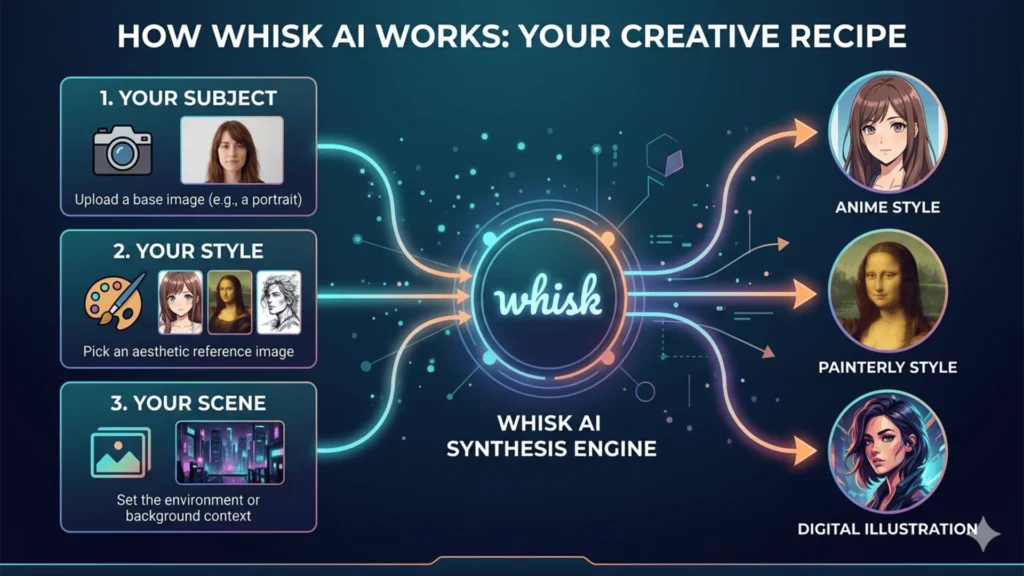
Where traditional platforms force you to describe what you want in text, Whisk asks you to show it. You provide 3 visual inputs:
- Subject (the person or thing you want depicted)
- Style Reference (the artistic aesthetic you want)
- Scene or Background (optional context)
Whisk then synthesizes these inputs into a unified masterpiece reflecting all three components. The result often feels far more intentional than pure text-based generation because you work visually from the very first step.
A Practical Walkthrough for Generating Portraits
Here’s how a typical session unfolds. Say you want an anime-style portrait of yourself. You upload a clear photo of your face as the subject, find a reference image capturing the anime vibe you love, and optionally add a background scene like a rainy city street. Whisk interprets the combination and generates something bridging all three files.
What many beginners miss is that you can swap style references without altering the subject. Want to see yourself as a watercolor painting or a comic book character? Keep the subject image constant and cycle through new style references. You upload your favorite style reference, sit back, and watch the platform generate endless variations of your portrait.
Bold Fact: Whisk AI lets you generate multiple style variations of the same subject without rewriting a single word of prompt text.
The free tier features daily generation limits, but it provides more than enough bandwidth for personal creative exploration.
How to Create Free AI Portraits That Avoid the Default Look
The difference between a generic AI generation and one that genuinely captures a mood is almost always in the details. Think like a photographer directing a physical shoot rather than a user typing a basic search query.
A highly effective portrait prompt contains 4 distinct layers:
- Subject Specifics (age, expression, distinctive features)
- Lighting (golden hour, overcast diffused, dramatic chiaroscuro)
- Artistic Style (photorealistic, painterly, editorial illustration)
- Mood or Atmosphere (the feeling the image should carry)
Not every layer needs to be exhaustive, but touching each one dramatically improves output consistency.
Portrait Prompts That Actually Work
Here is the exact difference specificity makes.
Weak: “Portrait of a man”
Strong: “Close-up portrait of a man in his 30s, weathered features, soft overcast light, oil painting style, thoughtful expression, neutral background”
The second version operates as a directed brief. For any free AI portrait generator like Adobe Firefly or Bing Image Creator, this level of detail produces a massive leap in quality. If the first output isn’t quite right, adjust one variable at a time. It’s a conversation with the tool, so don’t be afraid to experiment.
Generating Anime and Illustrated AI Styles
Anime is consistently the most-requested style category for free AI graphic generators, and it features more sub-styles than most people realize. Getting genuinely spectacular anime output comes down to mastering the visual vocabulary of the exact aesthetic you want.
Anime Keywords That Unlock Specific Aesthetics
These terms correspond to recognizable, established visual traditions:
- Studio Ghibli-inspired: lush, painterly backgrounds, warm color grading, a sense of quiet wonder
- Shonen battle manga: dynamic poses, motion lines, high contrast, bold ink work
- Slice-of-life anime: softer lines, muted palettes, natural lighting, emphasis on emotion
- Makoto Shinkai aesthetic: extraordinarily detailed atmospheric backgrounds, near-photorealistic light
- Chibi: proportionally exaggerated heads, simplified features, high saturation
- Cel shading: clean, flat color blocks common in classic anime
Pro Tip: Combining styles intentionally produces standout results. A prompt like “Cyberpunk character in Ghibli color palette with cel shading” looks highly considered and avoids the default AI aesthetic.
The Best Free AI Graphic Generators: An Honest Comparison
Not all free art AI generators are built the same, and picking the right tool depends heavily on what you are trying to accomplish. Different platforms are designed to prioritize distinct creative workflows.
| Tool | Best Use Case | Free Tier | Style Control | Learning Curve |
|---|---|---|---|---|
| Whisk AI | Image-to-image style synthesis | Yes (daily limit) | Very High | Low |
| Adobe Firefly | Commercial-safe, high quality | Yes (watermarked) | High | Low–Medium |
| Bing Image Creator | Fast, photorealistic, generous limits | Fully free | Medium | Very Low |
| NightCafe | Artistic styles, fine-tuning | Yes (credits) | Very High | Medium |
| Canva AI | Design integration, social graphics | Yes (limited) | Medium | Very Low |
| Craiyon | Casual experimentation | Fully free | Low | Very Low |
For most people starting out:
- Use Bing Image Creator for immediate results.
- Use Whisk AI when you have a specific style reference in mind.
- Use Adobe Firefly when commercial safety and high resolution matter most.
Developing Your AI Image Style Sense
This is arguably the most undervalued skill in the entire process. Visual vocabulary empowers your prompting and separates people who get consistently excellent results from those who feel like they are just pulling a slot machine lever.
When you encounter an illustration that stops you in your tracks, the most useful practice is to pause and analyze it. What is the color temperature? How are the shadows handled? What is the core composition choice?
Once you learn to hit the nail on the head with these descriptions, this reverse-engineering process becomes automatic. You’ll find yourself looking at a piece of art and instantly knowing which prompt keywords will produce something similar.
Bold Fact: Visual vocabulary is the single most transferable skill across every AI art tool, free or paid.
That is the true mastery. It isn’t just about operating the software; it’s about learning to see the world exactly the way the model sees it.
Common Mistakes with Free Art AI Generators (And How to Fix Them)
Most struggles with AI generated illustrations free tools trace back to a few recurring patterns.
Prompts that are too abstract ruin the output. Words like “emotional” and “beautiful” mean almost nothing to a machine. “Warm amber lighting, soft focus, nostalgic atmosphere” is specific enough to act upon.
Giving up too early is another trap. Your first generation is merely a starting point for iteration, not a final verdict. Change one variable at a time and track what shifts.
Ignoring composition ruins perfectly good ideas. Specifying whether you want a wide shot, a medium shot, or a macro close-up drastically changes the image’s overall feel. Many beginners skip this step, a mistake that leaves the framing entirely up to random chance.
Finally, underestimating free options is a massive oversight. There’s a persistent myth that unpaid tools produce inferior results. For personal art and social media, free AI graphic generators like Firefly deliver genuinely top-tier outputs.
Frequently Asked Questions (FAQs)
When I discuss AI art with other creatives, a few specific concerns always bubble up to the surface. Here are the most common questions regarding these tools.
Conclusion: The Creative AI Era Has Already Started
The tools explored here, like Whisk AI, Firefly, and the expanding ecosystem of free art AI generators, aren’t replacing human artists. They simply extend what is possible for folks who possess brilliant visual ideas but lack formal technical training.
Creativity was never strictly about technical execution. It was always about seeing something in your mind and finding a way to make it real. These models fundamentally change the “finding a way” part. The curiosity, the unique taste, and the desire to make something new remains entirely yours.
Don’t just dip a toe in the water; pick a free AI portrait generator that excites you and dive in. Iterate until the results genuinely surprise you. That element of surprise is where the magic truly begins.


