
How to Create AI Images from Text: Best Free Tools & Prompt Tips (2026)
You have probably scrolled past a mind-blowing digital illustration online, stopped, and thought: how on earth did someone make that? A few years ago, that required serious technical chops and expensive software. Now, text-to-image AI tools let you bypass the learning curve entirely. This guide will help you generate striking visuals from a few simple words, avoiding the overwhelming frustration of staring at a blank text box. Let’s cut to the chase and get you creating immediately.
The technology moves incredibly fast. Even folks who mastered prompt engineering just 12 months ago are relearning the ropes today. We aren’t dealing with blurry, weird-looking outputs anymore. Modern generators produce cohesive, stylized art that starts with nothing but a text prompt.
You type a description, wait a few seconds, and receive a professional-quality image. You don’t need Photoshop skills or an art degree. The gap between average and impressive output rarely involves technical knowledge. It comes down entirely to how effectively you communicate with the algorithm. The final image is shaped entirely by your vocabulary.
What Are Text-to-Image AI Tools (And Why They Matter)
These platforms train on massive datasets, analyzing hundreds of millions of image-text pairs. Through this exposure, they learn the deep connections between visual concepts and language. They understand the way fur catches afternoon light, a specific framing convention used in portrait photography, and the exact color moods found in impressionist paintings.
The model absorbs more visual information than any human could process in 10 lifetimes. It then puts that vast understanding to work every time you hit generate.
How Diffusion Models Actually Work
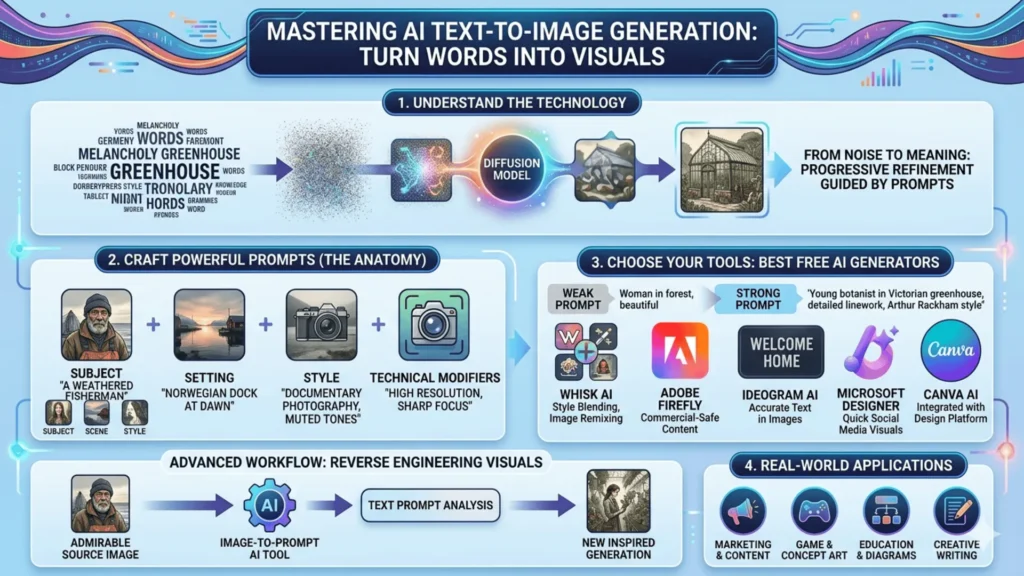
The dominant technique driving these platforms is called diffusion. The system starts with visual noise, a chaotic foundation waiting to be molded. It progressively clears away the static based on your instructions. You type your desired concept, watch the static dissolve, and see your vision emerge on the screen.
What catches beginners off guard is the intense sensitivity to word choice. If you swap “melancholy” for “somber” in a prompt, the output shifts unpredictably. The model doesn’t guess your intentions. It reads your text literally and executes those specific commands.
FACT: “A golden retriever sitting in a park” and “a golden retriever resting lazily in autumn sunlight” produce noticeably different results. Word choice carries enormous weight.
That sensitivity is exactly why learning prompt engineering is worth your time. The technology handles the heavy lifting, so your only job is to provide clear direction.
Meet Whisk AI: Google’s Visual Remix Approach
Most text-to-image AI tools hand you a blank box and expect you to conjure a flawless vision from scratch. If you lack the vocabulary to describe it, you just stare at a blinking cursor. Whisk AI, an experimental platform developed by Google Labs, takes a much more forgiving route.
Instead of relying purely on text, this platform lets you upload images as references across three distinct categories: subject, scene, and style. You drop in a photo of your cat, select a moody forest background, and upload a vintage oil painting for the aesthetic. Whisk pulls them together into a unified image using Gemini and the powerful Imagen 3 model.
Here is a real-world scenario. A designer needed a children’s book character. She had a rough pencil sketch, a woodland setting reference, and a picture book featuring a striking color palette. Rather than spending 60 minutes trying to describe all of that in words, she fed all three files into Whisk. She hit the ground running and started iterating immediately. Within 10 minutes, she possessed a usable concept.
What Makes Whisk Different from Standard Generators
The real power isn’t just the image inputs. It’s the way images and text work together. You utilize images for things that are genuinely hard to articulate, like mood and style reference. Then, you leverage text to fill in specific details that photos can’t convey, like adding a crescent moon. Most generators treat images and text as separate workflows, but Whisk treats them as collaborative partners.
The final output is rendered with a blend of both inputs. What would have taken an hour of prompt engineering took about 10 minutes using Whisk AI’s visual remixing approach.
How to Write Text-to-Image Prompts That Actually Work
Here is a harsh lesson I learned early on: longer prompts do not guarantee better art. I once spent 20 minutes writing an exhaustive, highly detailed paragraph only to receive a confusing, cluttered mess. The secret isn’t describing everything. It’s knowing exactly which details matter most. Think of it as strategic specificity. You pinpoint the elements that shape the frame, and you let the machine handle the rest.
The 4-Layer Anatomy of a Strong AI Prompt
Effective instructions for text-to-image AI tools utilize four layers that build upon each other:
- Subject: The central focus, described specifically (“a weathered fisherman in his 60s“)
- Setting/Context: Where and when (“standing at a fog-covered Norwegian dock at dawn”)
- Style/Aesthetic: The visual language (“documentary photography, natural light, muted tones”)
- Technical modifiers: Quality signals (“high resolution, sharp focus, cinematic framing”)
COMBINED EXAMPLE: “A weathered fisherman in his 60s standing at a fog-covered Norwegian dock at dawn, documentary photography style, natural light, muted tones, high resolution, cinematic framing.”
The style layer tends to do the heaviest lifting. Naming an art movement, a specific photography technique, or a historical period provides a rich visual framework. This strategy does far more work than piling on generic adjectives.
Before and After: A Real Prompt Comparison
Weak prompt: “A woman in a forest, beautiful, magical”
Result: A generic, softly lit fantasy figure. It functions fine technically, but it remains completely forgettable.
Strong prompt: “A young botanist in a Victorian-era greenhouse, surrounded by enormous ferns, warm amber lamplight, illustrated in the style of Arthur Rackham, detailed linework, editorial illustration”
Result: A distinctive, atmospheric piece, a creation ready to be used as concept art.
The weak prompt relies on words the algorithm has processed millions of times. Those terms have lost their directional power. The strong prompt delivers specific anchors, and the resulting art reflects that clarity instantly.
Common Prompt Mistakes to Avoid
- Being too abstract: “Beautiful art” gives the system almost nothing concrete to work with.
- Contradicting yourself: “A dark, bright scene” forces the engine to guess poorly.
- Skipping the negative prompt: Specifying what to exclude cleans up the render. Commands like “no watermarks, no blurry backgrounds” work wonders.
- Forgetting aspect ratio: Landscape, portrait, and square layouts serve different purposes. Define it clearly.
- Overloading with adjectives: More isn’t always better. Clean, direct requests consistently outperform rambling paragraphs.
The Best Free AI Image Generators from Text
If you aren’t ready to pay for a subscription yet, the free tier ecosystem is genuinely incredible right now.
| Tool | Best For | Text-in-Image | Beginner-Friendly | Free Access |
|---|---|---|---|---|
| Whisk AI | Style blending, image remixing | Limited | Very high | Yes |
| Adobe Firefly | Commercial-safe content | Good | High | Limited (credits) |
| Microsoft Designer | Quick social media visuals | Strong | High | Yes |
| Ideogram AI | Images with accurate embedded text | Excellent | Medium | Yes |
| Canva AI | Brand-consistent content | Moderate | Very high | Limited |
IDEOGRAM TIP: Have you ever asked a generator to produce readable text on a poster or book cover? You usually receive a jumble of convincing-looking gibberish. Ideogram solves that problem flawlessly. You type your exact phrase, wait a few seconds, and watch the correct spelling appear perfectly integrated into the scene.
Using Image-to-Prompt AI to Reverse Engineer Visuals
Once you nail the basics, one specific technique accelerates your learning drastically. You can use image-to-prompt AI tools to reverse engineer aesthetics you admire. It sounds a bit nerdy, but it’s incredibly practical.
The Reverse Engineering Workflow
Tools like CLIP Interrogator analyze an existing photo and generate a text description capable of recreating it. The output rarely resembles pretty prose. It usually reads like a chaotic string of tags. However, it reveals the exact vocabulary the machine associates with those visual qualities.
Here is a simple workflow to try:
- Find an aesthetic you want to replicate.
- Run it through an image-to-prompt AI tool.
- Take the output, clean up the tags, and insert it as the style layer of your next prompt.
After repeating this process a few times, you begin to understand why certain words trigger specific visual responses. That knowledge sticks with you, making every subsequent prompt sharper. You aren’t copying the reference material. You are learning the grammar of a brand new language.
Real-World Uses for AI-Generated Imagery
The practical applications extend far beyond digital art communities. Everyday professionals save massive amounts of time with these resources every single week.
- A freelance marketer uses free AI image generators from text to produce custom headers, saving roughly 3 to 4 hours of stock photo hunting per week.
- An indie game developer uses Whisk AI during pre-production to establish a shared visual language before official development begins.
- Teachers create custom diagrams tailored exactly to their unique lesson plans.
- Writers visualize characters to sharpen their manuscript descriptions.
- Personal users print custom artwork for their homes, proving how accessible this technology has become for everyone.
Frequently Asked Questions (FAQs)
When folks start exploring text-to-image AI tools, a few common concerns always surface. Here are the clear answers you need:
Conclusion: Where Text-to-Image Generation is Heading
Text-to-image AI tools move faster than our ability to fully absorb their impact. What feels impressive today will likely look basic in 12 months. That isn’t a reason to wait. It’s a reason to start right now while the learning curve remains manageable.
Whisk AI and tools like it point toward a brilliant future. They aren’t replacing creative skill. They are making visual expression accessible to folks who never had a path into it before.
Start with a specific concept you actually want to see. Don’t use a random test prompt. Build an image you would actually use for a project or a social post. That concrete motivation forces you to refine your instructions deeply.
Through that process of trial and adjustment, you will develop a genuine feel for this new visual language. It takes a little practice, but it eventually clicks. Once it does, the results are incredibly rewarding.


