

Unlock Unlimited Creativity: The Best Free AI Image Generators Right Now
Free artificial intelligence image generators have fundamentally changed what is possible on a zero budget. Picture this: you have a creative idea burning in your head. A surreal landscape, a product mockup, a portrait in a specific artistic style. But you have zero budget for stock photos or a graphic designer. A year ago, that idea would have stayed in your head.
Some of the best creative tools available today cost nothing. That still feels strange to say, because for most of design history, quality cost money. Real money. Stock photo subscriptions, software licenses, freelance budgets. The barrier to making something that looks good was real, and most people accepted it.
Free AI image generation has quietly demolished that barrier. But here is what nobody tells you upfront: not all free tools are equal, the limits vary wildly, and a few of them are genuinely extraordinary while others will waste your afternoon. This guide cuts through the noise. We will dig into Google Whisk AI, a tool doing something genuinely innovative, alongside the best alternatives worth your time. No hype. Just honest takes on what works, what does not, and where each tool earns its place.
What Separates a Great Free AI Image Generator From a Frustrating One
The word “free” covers a lot of ground. Some tools are free in the way a trial is free, generous for 20 minutes and then a wall. Others are substantively free in ways that matter for regular creative work.
Here is what actually matters when evaluating any free AI image generator:
- Output quality: Sharpness, coherence, and whether the result looks intentional or glitchy.
- Prompt comprehension: Does it understand nuance, or does it reduce your description to something generic?
- Daily or monthly limits: Are they realistic for actual use, or merely decorative?
- Image-to-image capability: Can you feed it a reference image, or only text?
- Commercial terms: Can you actually use what you make?
One thing that trips people up is optimizing entirely for output quality without checking commercial terms. Adobe Firefly and Bing Image Creator have very different rules around commercial use. If you create anything for a client or a business, that is not a detail you want to discover after the fact.
Google Whisk AI: A Fundamentally Different Approach
Most free AI image generators work the same basic way: you type a description, the model interprets it, and an image appears. That model works, but it carries an inherent friction. Translating a visual idea into precise words is genuinely hard. Designers know this. Photographers know this. The image in your head rarely survives the trip into text.
Whisk AI, Google’s experimental image tool built on its Imagen 3 model, sidesteps that problem almost entirely. Instead of describing what you want, you show it. You upload or select a subject (a character, a face, an object), choose a scene, and pick a style reference. Then Whisk synthesizes something new from those visual inputs.
How Whisk AI Actually Works
The technical approach here is worth understanding because it directly affects how you use the tool. Whisk does not do simple image blending or collaging. It uses your reference images to ground the generation, extracting semantic meaning from them and then generating a new image that reflects that understanding in a fresh composition.
In practice, the output will be recognizably related to your inputs without being a copy of them. Drop in a photo of a specific dog, a forest path, and a watercolor painting as your style reference and you will get a watercolor illustration of that dog on a forest path, not a Frankenstein mashup. That is a meaningfully different kind of creative control.
Who Whisk Is (and Is Not) For
Whisk excels at rapid concept exploration and creative remixing. For content creators building visual libraries, designers sketching directions, or anyone who thinks in images rather than words, it is one of the more intuitive free AI image tools available.
But if you need surgical control over outputs, specific compositions, precise text rendering, exact color palettes, Whisk’s image-driven approach can feel imprecise. You are suggesting, not directing. For that level of control, text-prompt tools with negative prompting capabilities like Stable Diffusion serve better.
The Best Free AI Image Generators Worth Knowing
Free AI image creation tools have removed the cost barrier that once separated hobbyists from professionals. Here is what each major option brings to the table.
Adobe Firefly
Firefly is what happens when a company with 40 years of design tool experience builds an AI image generator. It is polished, thoughtful, and commercially safe in a way that genuinely matters. The free tier gives you a monthly allotment of generative credits, which resets each month and covers moderate use comfortably.
What makes Firefly genuinely different is its training data. Adobe built it on licensed images and public domain content, which means generated images are cleared for commercial use. That is something you cannot assume with every free AI tool. If you are a small business owner, freelancer, or anyone creating visuals for professional purposes, that distinction carries real practical weight.
The integration with Photoshop and Adobe Express is also harder to dismiss than it sounds. Having a free AI image generator embedded in your existing workflow, rather than running in a separate tab, removes significant friction from the creative process.
Bing Image Creator (Powered by DALL-E)
Microsoft’s free AI image generator is probably the most accessible starting point for someone who has never used one of these tools before. You sign in with a Microsoft account, type a description, and within seconds you have four image options. Daily boost credits ensure fast generation, and slower unlimited generations remain available after, so you are never fully cut off.
The quality is reliably good across a wide range of styles. But what stands out about Bing’s implementation is its text rendering, which is one of the most notoriously difficult tasks for AI image generators. When you need an image that includes readable words or signs, this is often the stronger choice over tools that muddy or hallucinate text.
Canva AI Image Generator
Canva’s AI image tool gets overlooked in most roundups because Canva is primarily a template platform. That undersells it. For anyone already doing design work in Canva, having a free AI image generator embedded directly in the interface is genuinely convenient. You can generate an image and drop it into a social post or presentation without switching contexts.
The free tier limits are tighter than other options here, but the workflow integration compensates. It is a contextual tool, not a standalone powerhouse.
Stable Diffusion (Local or via DreamStudio)
Here is where things get interesting for anyone willing to go a little deeper. Stable Diffusion is open-source, which means running it locally on your own hardware costs nothing. No credits, no daily limits, no subscriptions. The output quality, particularly with community fine-tuned models, can match or exceed paid tools.
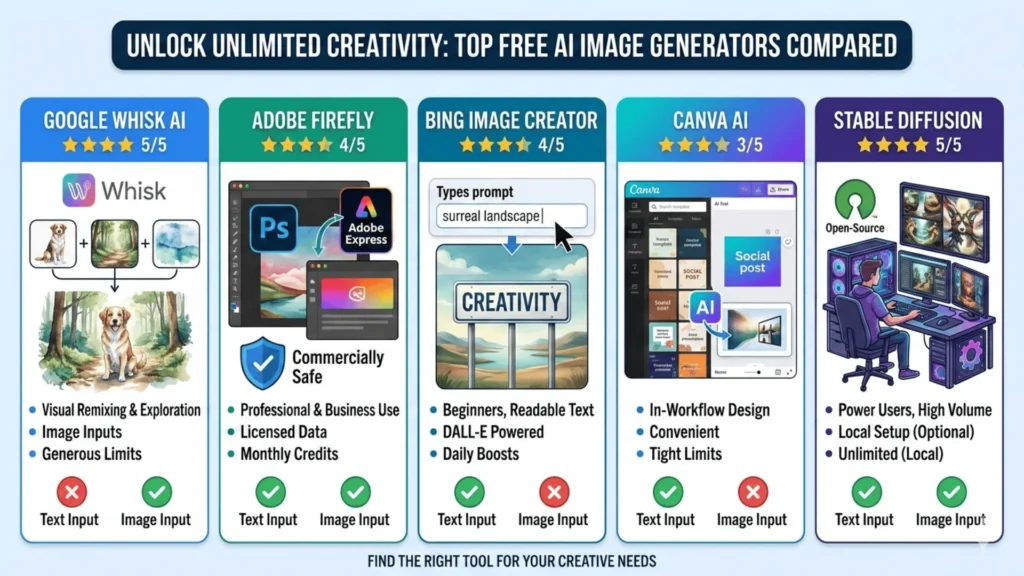
The tradeoff is setup complexity. You will need a capable GPU and some comfort with a local GUI like AUTOMATIC1111. Not exactly plug-and-play. But if you produce high volumes of images for creative or professional work, the one-time investment in setup pays back quickly. Cloud platforms like DreamStudio offer a free tier if you want Stable Diffusion’s quality without the local setup headache.
Free AI Image Generator Comparison
| Tool | Output Quality | Free Limit | Best Use Case | Commercial Use | Image Input |
|---|---|---|---|---|---|
| Google Whisk AI | ★★★★★ | Generous | Visual remixing and exploration | Check terms | Yes |
| Adobe Firefly | ★★★★ | Monthly credits | Commercial and business use | Yes | Yes |
| Bing Image Creator | ★★★★ | Daily boosts | Beginners, text in images | Limited | No |
| Canva AI | ★★★ | Tight limits | In-workflow design | Limited | No |
| Stable Diffusion | ★★★★★ | Unlimited (local) | Power users, high volume | Yes | Yes |
How to Actually Get Better Results
A confession: I spent weeks blaming tools for mediocre outputs before realizing the issue was my prompts. The tools were fine. My descriptions were lazy.
A few things that made a measurable difference:
Describe the mood, not just the subject. “A coffee shop” is generic. “A narrow coffee shop in early morning light, steam rising from cups, slightly overexposed like an old film photo” gives the model something real to work with. Atmospheric details matter more than most people expect.
Use reference images whenever the tool allows it. This is where Whisk AI shines, but many text-based tools also accept image references for style guidance. A good reference image communicates in one second what twenty words struggle to convey.
Treat your first output as a draft, not a result. The best practitioners using these tools iterate constantly, adjusting one variable at a time rather than generating entirely new prompts. Change the lighting descriptor. Simplify the composition. Adjust the style reference. Small edits compound quickly.
Most platforms now include upscaling features that improve image quality free of charge, recovering significant detail from lower-resolution outputs. Free AI imaging tools have also expanded to cover everything from portrait generation to photorealistic landscapes, so the creative ceiling keeps rising.
Frequently Asked Questions (FAQs)
Today, we will discuss the most popular questions that can be used to test a friendship. Here are the comprehensive details:
Where This Is All Going
The gap between free and paid AI image generation narrows faster than most people realize. Two years ago, meaningful quality required a subscription. Today, Google Whisk AI, Firefly’s free tier, and Bing Image Creator produce results that would have seemed implausible on a free plan not long ago.
What I find genuinely interesting is the direction tools like Whisk point toward. The shift from text prompts to visual inputs reflects a broader evolution: these tools now meet creatives where they already think, rather than forcing creatives to adapt to how the tools work. That is a meaningful change in philosophy, and it suggests the next generation of free AI image tools will be even more intuitive.
Start with Whisk AI if visual-reference workflows appeal to you. Try Bing Image Creator if simplicity is the priority. And if you are ready to go deeper, Stable Diffusion’s local setup represents an afternoon investment that pays dividends indefinitely. The barrier to creative output has never been lower. The only move left is to actually make something.


