

Reimagine Your Photos:The Complete Guide to Image to Image AI
You already have a solid product photo with a clean background and good composition, but the whole thing feels flat. It doesn’t match the moody, editorial aesthetic your brand is going for. You need it stylized, atmospheric, maybe a little cinematic. Not too long ago, that meant either a reshooting session or a designer’s invoice. Today, you upload the image, type a description, and get something genuinely compelling in about 30 seconds.
That’s what image to image AI actually delivers in practice, and it’s more useful than most coverage of the technology suggests. Tools like Whisk AI have pushed the category forward significantly, but the whole space has matured quickly. Whether you’re a photographer, marketer, designer, or just someone with creative ideas and a phone camera, real utility exists here if you know how to use it well.
What’s interesting is that the learning curve isn’t really technical. It’s creative. The challenge isn’t learning the interface. It’s developing the instinct for how to guide the AI toward something intentional rather than just random. That’s what this guide is for.
What Image-to-Image AI Actually Does
The simplest way to think about image to image generation is this: instead of asking an AI to conjure something from a blank canvas, you hand it something to start from. Your uploaded photo, the reference image, acts as a visual anchor. The AI analyzes its structure, composition, color relationships, and subject matter, then rebuilds it in a new direction guided by your text prompt.
Most modern image to image AI generators use diffusion models under the hood. Here’s the non-technical version: the model takes your photo, introduces controlled noise into it, and then rebuilds it step by step. But instead of reconstructing the original, it reconstructs something shaped by your text prompt. Think of it like giving a sculptor a rough clay form and saying “keep the proportions, but make it look like someone carved it from marble.” The starting form guides the result; your words define the finish.
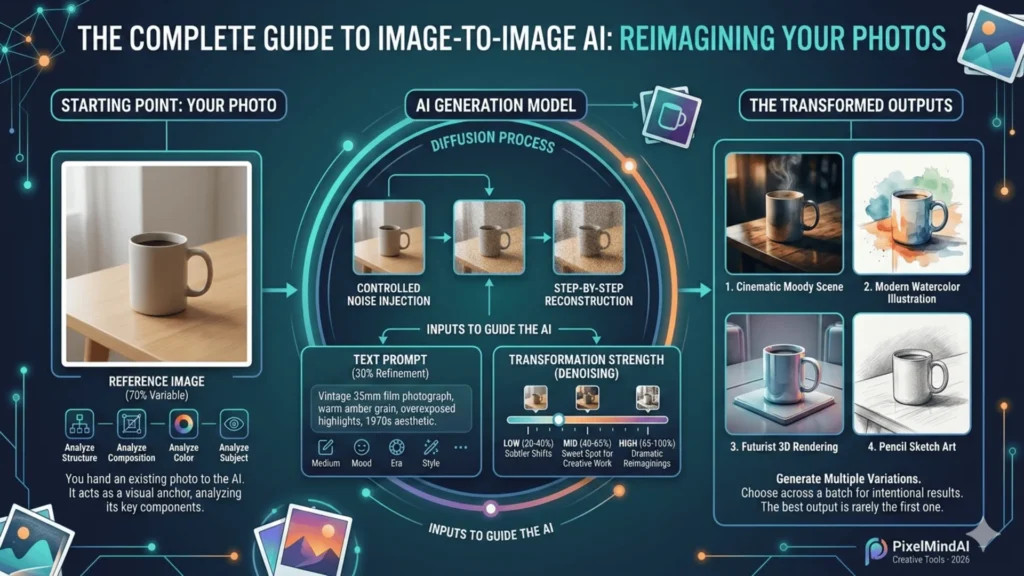
The crucial variable is transformation strength, sometimes called denoising strength. This setting determines how much of the original image the model preserves versus how freely it reimagines it:
- Low strength (20–40%): Subtle stylistic shifts, composition stays close to the original
- Mid-range (40–65%): The sweet spot for most creative work, recognizable transformation with original structure intact
- High strength (65–100%): Dramatic reimaginings loosely inspired by your photo
Most of the practical skill in AI image transformation comes from learning to read that dial correctly for different goals.
The Best Image to Image AI Tools Right Now
The market has gotten crowded, and that’s mostly good news for users. But not all tools serve the same needs. Whisk AI, developed by Google, is notable for letting you input multiple reference images separately: one for the subject, one for the scene, one for the stylistic feel. That three-channel input system produces blended outputs that are much more controlled than single-image tools. For someone who has a clear visual mood in mind but can’t fully articulate it in words, that’s genuinely powerful.
Here’s a comparison of the major players in the image to image AI generator space:
| TOOL | BEST USE CASE | FREE TIER | WHAT MAKES IT DIFFERENT |
|---|---|---|---|
| Whisk AI | Multi-reference creative blending | Yes | Separate subject / style / scene inputs |
| Stable Diffusion img2img | Power users, maximum control | Yes (local) | Open-source, deep parameter control |
| Adobe Firefly | Professional design workflows | Limited | Native Photoshop integration |
| Midjourney (–cref flag) | High-quality stylized art | No | Consistent character reference outputs |
| Canva AI | Social media creators, quick edits | Yes | Template-friendly, minimal learning curve |
Start with a free image to image AI generator before committing to anything paid. Whisk and Canva both offer solid free access. They’ll help you discover your actual use case, which is often different from what you imagined before you start experimenting.
How to Use an Image to Image Generator Effectively
The workflow is simple. Getting consistently good results isn’t. Here’s what separates clean, intentional outputs from muddy, unpredictable ones.
Step 1: Choose and Prepare a Strong Reference Image
Well-lit, in-focus photos with a clear subject transform most predictably. Avoid images with heavy compression, extreme darkness, or very cluttered backgrounds. The AI needs coherent visual information to work from. If your main subject gets buried in detail, crop before uploading. The aspect ratio you input often shapes the output’s composition, so frame intentionally.
Step 2: Write a Specific, Style-Focused Prompt
Vague prompts produce vague results. Skip “make it cool.” Instead, prompt the medium, the mood, and the era: “Vintage 35mm film photograph, warm amber grain, overexposed highlights, 1970s aesthetic.” The more visual vocabulary you give the model, the more intentional the output. Keep it to 20 to 40 words. Past a certain length, competing instructions create visual noise in the output.
Step 3: Set Transformation Strength Deliberately
- Low strength (20–40%): Subtle stylistic shifts, composition stays close to the original
- Mid-range (40–65%): The sweet spot for most creative work
- High strength (65–100%): Dramatic reimaginings loosely inspired by your photo
Start in the middle, then adjust toward your goal.
Step 4: Generate Multiple Variations, Then Choose
Run 4 to 6 generations from identical inputs. The stochastic nature of diffusion models means each run differs meaningfully. Choosing across a batch takes twenty seconds and dramatically improves your final result. The best output is rarely the first one.
Where Image-to-Image AI Gets Most Useful
The most compelling thing about these tools isn’t the wow factor. It’s the practical time savings. And the applications are wider than most people initially expect.
E-Commerce Product Photography
This is probably the highest-value use case right now. You can photograph a product against a plain background, then transform images into styled seasonal scenes. A coffee mug on a snowy morning table, the same mug on a warm patio in summer, all without booking a new shoot. Small brands use this to produce contextual imagery that used to require serious budgets.
Concept and Architecture Visualization
Designers upload rough spatial sketches and use AI image transformation to show clients near-photorealistic interpretations before anyone makes a single construction decision. What used to require a 3D rendering job now takes minutes of iteration.
“The real power isn’t replacing photography. It’s eliminating the gap between having an idea and seeing it clearly enough to make decisions.”
Brand Consistency
If you have one beautifully styled image that captures your brand’s visual tone, you can use it as a style reference to transform a batch of inconsistently photographed images into something cohesive. One good reference image becomes a visual standard. That’s a genuinely different way of thinking about AI image to image generators: less as a novelty, more as a creative production tool.
Common Mistakes and How to Avoid Them
Even with great tools, certain patterns consistently lead to disappointing results. These are the ones worth knowing upfront.
Fighting the input image. If your reference photo is a soft, pastoral landscape and you’re prompting for “gritty urban street photography,” the model has to bridge an enormous conceptual gap. Use your image to set the foundation, and use your prompt to steer style and mood. Don’t use the prompt to contradict the image.
Expecting photorealism from stylized inputs. If you start with a cartoon illustration and prompt for “photorealistic portrait,” you’re working against the model. Stylized input tends to produce more interesting stylized output. Work with your reference, not against it.
Accepting the first output. Generating variations is almost always worth the extra thirty seconds. Even small prompt adjustments, swapping “cinematic” for “editorial” or adding “golden hour,” can shift an output significantly.
The 70/30 Rule: The quality of the reference image often matters more than the prompt. A poorly lit, low-resolution, or compositionally cluttered photo produces limited results no matter how precise your text instruction. Think of the reference image as the 70% variable and the prompt as the 30% refinement. Invest in your input first.
The Ethics and Limitations Worth Understanding
The creative community hasn’t fully landed on clear norms here yet, and it’s worth thinking through carefully. Using someone else’s copyrighted image as a reference input, even if the output looks nothing like it, sits in a legally and ethically murky space. Most platforms’ terms of service address this, though enforcement remains inconsistent. The safest and most defensible approach is to use images you own or have the rights to.
On limitations: image to image AI still struggles with fine text rendering inside images, precise hand anatomy, and very small detail work. If your use case requires pixel-level accuracy, such as technical diagrams, legal documents, or product specs, these tools aren’t reliable yet. For creative and marketing applications, the quality bar has genuinely crossed the threshold of professional usability.
Worth Noting: Transparency with audiences matters. If AI-transformed imagery appears in professional or editorial contexts, disclosure builds trust rather than undermining it. The technology is impressive enough on its own merits.
Frequently Asked Questions (FAQs)
Today, we will discuss the most popular questions that can be used to test a friendship. Here are the comprehensive details:
Your Next Photo Is Already Your Starting Point
Image to image AI has done something genuinely interesting to the creative process: it makes the photos you already have far more valuable. A mediocre shot becomes a mood piece. A plain product photo becomes a campaign asset. A rough sketch becomes a client-ready visualization. The technology isn’t a replacement for creative vision. It’s an amplifier for it.
The practical advice is simple: start with the best photo you have, build a clear stylistic prompt, dial in your transformation strength, and iterate. The first run is a starting point, not a verdict. You’ll be surprised how quickly your instincts develop, and how quickly “what if this looked like…” stops being a hypothetical.
Pick one photo you’ve always wished looked different. Upload it. See what happens.


